AI virtual try on : Saifs AI
- 4.0
- Rating
- 10.00K
- Installs
- Free
- Price

 Analysis by App-foxy
I approached Saifs AI as someone getting ready to shop for clothes online, not as someone looking for another beauty filter. The app belongs to the beauty category, but its practical purpose is broader: it lets me explore virtual clothing try-ons with AI while moving between major shopping platforms. That makes it interesting for anyone who regularly hesitates over fit, color, or overall appearance before placing an order.
My first impression was that the app is built around a simple question: “How might this outfit look on me?” That question sounds easy, but online shopping usually answers it with static product photos and a model whose body, pose, and styling may be very different from mine. Saifs AI tries to close that gap. It does not replace a fitting room, but it gives me an extra visual checkpoint before I spend money.
From choosing an outfit to seeing a more personal preview
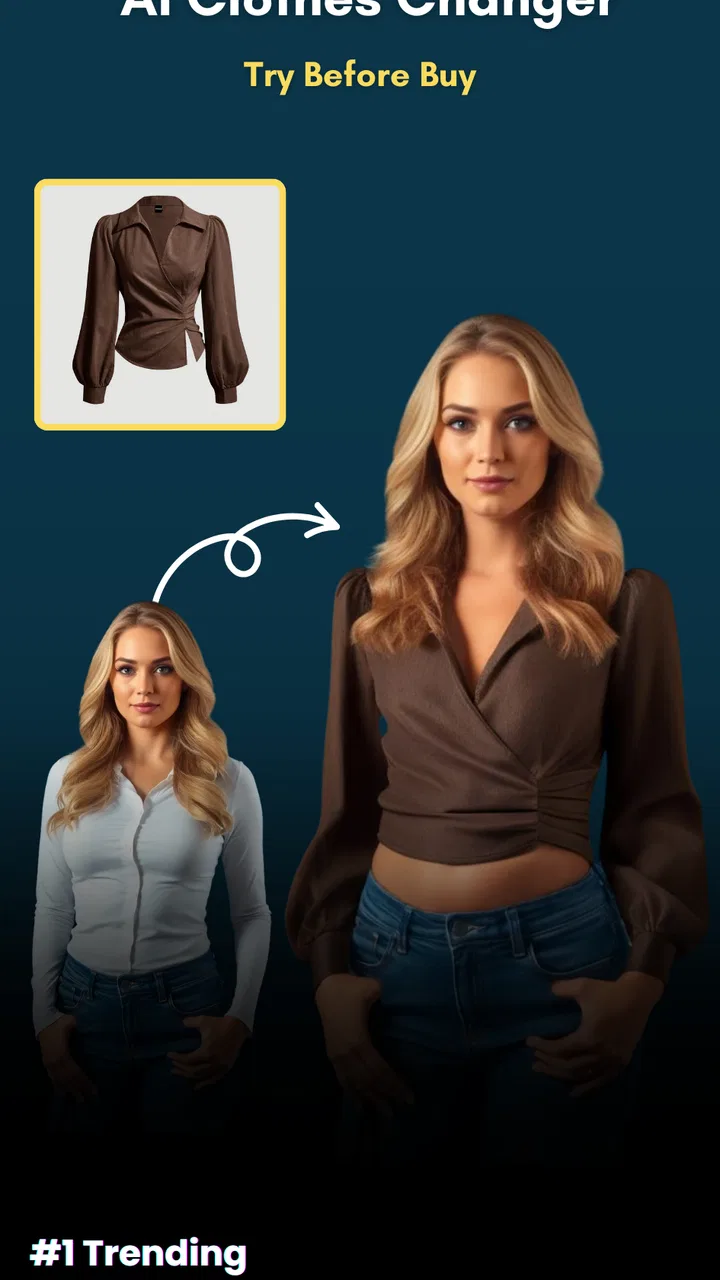
The most useful way to understand the app is as a workflow. I start with a clothing item on a shopping platform, then move toward a virtual preview rather than relying only on the retailer’s images. The value is not just the final image; it is the handoff between browsing, selecting an item, preparing the visual input, and deciding whether the result is useful enough to continue shopping.
You May Also Like

 Blood Strike: 2.5 Anniversary
Blood Strike’s Loadouts Turn Every Drop Into a Tactical Gamble
A close look at Blood Strike’s custom loadouts: how fast access to signature weapons reshapes its battle royale rhythm, rewards preparation, and narrows the gap between fights.

 Pandora - Music & Podcasts
Pandora’s Music Is Easy to Start, but Harder to Recover
Pandora’s strength is its low-effort path from a seed to a station. Its weak spot is how much confidence it asks you to place in connection, setup, and quiet recovery.

 8 Ball Pool
 Is Built on Rivalries, Rematches, and Routine
A close look at the rivalries, rematches, shared routines, and unanswered safety questions that turn a quick pool match into a persistent mobile community.

 Samsung Music
’s Quiet Strength Is Playing What You Already Own
Its reach comes less from spectacle than from dependable access to a personal library. That simplicity is both the app’s strongest retention engine and its ceiling.

 AccuWeather: Weather Radar
AccuWeather Review: A Quick, Clear Forecast for Everyday Decisions
For everyday plans, the best forecast is the one you can understand quickly. AccuWeather makes rain timing, radar, and local conditions easy to act on, with a few trade-offs.

 Hill Climb Racing
Why Hill Climb Racing Still Turns Crashes Into One More Run
A tiny car, a bumpy hill and one more upgrade: Hill Climb Racing keeps resurfacing because its simple chaos makes every near-miss feel personal.
More From Our News Desk



That process makes Saifs AI different from a conventional beauty editor. A beauty editor usually begins with a selfie and focuses on the face, skin, hair, or makeup. Here, the clothing is the central object. The app’s AI has to make the garment feel connected to the person in the image, which is a more demanding task than placing a simple color effect over a photo.
I would recommend beginning with a clear, uncomplicated photo. A full-body or well-framed image gives the virtual try-on a better chance of producing a readable result than a cropped portrait or a picture with several people. This is one of the first practical lessons: the quality of the input controls how much confidence I can place in the output.
Preparing the starting image
Before judging an outfit, I would choose an image with enough space around the body and clothing. Busy backgrounds, unusual poses, heavy layers, or objects blocking the torso can make the preview harder to interpret. This is not a reason to reject the app; it is a reason to treat the first image as part of the process rather than as an afterthought.
A useful trick is to keep two or three suitable photos ready before browsing. One might show a relaxed standing pose, another might offer a slightly different angle, and a third could work better for tops or jackets. This creates a small personal testing set. It also prevents the shopping decision from being controlled by one awkward photograph.
I would not use the preview as a precise sizing tool. A virtual image can help me judge whether a silhouette, neckline, sleeve shape, or general color direction suits me, but it cannot reliably replace the retailer’s size chart or information about fabric stretch. The best workflow is to use Saifs AI for visual filtering, then return to the product details for measurements and fit information.
Moving from a shopping page to the try-on
The next stage is the handoff from shopping discovery to visual testing. Saifs AI is intended to work across major shopping platforms, so its appeal is strongest when I am already comparing clothes from different places. Instead of mentally translating a model photo into my own appearance, I can use the app as a second opinion while deciding which items deserve closer attention.
This handoff is also where friction can appear. A shopping page and a try-on tool do not always present information in the same way. I may need to keep track of the product, return to the retailer, or compare the generated view with the original listing. I would therefore keep the product page accessible and note the item’s color and style before switching contexts. That small habit reduces the chance of confusing similar garments.
The app is most valuable when I use it to narrow choices, not when I expect it to complete the entire purchase. I can test several visually different items, remove the ones that clearly do not work for me, and then inspect the remaining products through the retailer’s normal buying flow. In that role, the app saves attention rather than simply adding another image.
Reading the generated result carefully
Once the virtual preview appears, I look at broad visual signals first. Does the garment sit in the right general area? Does the shape resemble the original item? Is the color direction close enough to help with a decision? I avoid zooming in immediately because small rendering imperfections can distract from the question the app is actually good at answering: whether the overall look is worth investigating.
There is an important difference between visual plausibility and physical accuracy. A generated image may show a convincing outfit while still missing details such as fabric weight, exact drape, stitching, transparency, or how the garment behaves when moving. I treat the result as a styling preview, not proof that the item will fit exactly as shown.
This distinction is especially important with tailored clothing, fitted trousers, structured jackets, and garments whose appearance depends heavily on fabric. For those purchases, I would use the preview to assess proportion and coordination, then rely on measurements, customer photographs, and return terms before committing.
Using the result for real decisions
In everyday use, I can imagine opening the app before buying clothes for work, a trip, or an event. Suppose I am choosing between a neutral jacket and a brighter one. The retailer’s photos may make both look appealing, but the virtual try-on can help me see which direction feels more natural with my own appearance. That does not settle the decision by itself, yet it can quickly reveal which option deserves more attention.
Another useful scenario is reducing impulse purchases. If I am tempted by several similar items, I can compare them visually and ask whether they truly add something different to my wardrobe. A preview may show that two pieces create almost the same effect, making it easier to keep one on the shortlist instead of buying both.
For people who shop across multiple platforms, the app can also act as a consistent checkpoint. Retailer photography varies widely, while my own reference image remains familiar. That consistency helps me compare style ideas without being influenced quite as much by model poses, studio lighting, or different presentation choices.
The handoff back to shopping
The final handoff is from the generated preview back to the purchase decision. I would compare the virtual image with the original product photos, the written description, and the available size information. If the garment looks appealing in the preview but the listing describes a very different cut, I would trust the product details over the generated image.
This is also the point where I would check whether the exact color and version of the item match what I tested. Clothing listings can include several variants, and a preview is only useful if I know which one it represents. Keeping the item name, color, and product page visible during the comparison is a simple but worthwhile safeguard.
Saifs AI works best here as a decision aid. It helps answer “Should I explore this item further?” rather than “Will this definitely fit me?” That narrower promise is still useful, especially for people who abandon online shopping because they cannot picture themselves wearing what they see.
What the app does well in this workflow
The strongest part of the experience is the move from abstract browsing to personal visualization. Many online clothing decisions fail before sizing even becomes the issue: I simply cannot imagine how an unfamiliar cut or color would look on me. A virtual try-on gives that uncertainty a more concrete form.
The app is also more practical than using a generic image editor. Manual editing can place clothing over a photo, but it usually requires patience and a good eye for alignment. Saifs AI is designed around the clothing try-on problem, so the workflow feels more focused. I spend less time manipulating an image and more time evaluating the outfit.
Its cross-platform purpose is another meaningful strength. I do not have to limit the idea of virtual try-on to one retailer’s catalog. When I am comparing products from major shopping platforms, the app has a chance to become a reusable part of my shopping routine rather than a novelty tied to a single store.
The app is free to install, which makes experimenting easier. It carries an Everyone age rating, so its basic positioning is accessible to a broad audience. The developer is Saifee Software Solution, and the current release is version 1.5.8. Those details matter less than the workflow itself, but they help place the app in context for someone deciding whether to try it.
Where the workflow becomes less reliable
The main weakness is the natural limit of AI-generated clothing previews. The image may be persuasive without being exact. If a sleeve, hem, collar, or pattern is represented imperfectly, I could form an overly positive impression. The more important the purchase, the more I would treat the preview as an early filter instead of final evidence.
Input preparation can also slow things down. Someone who wants instant results from any random photograph may find the process less satisfying than someone willing to choose a cleaner image. The app’s usefulness depends partly on cooperation from the user: a thoughtful input, a clear product selection, and a careful comparison afterward.
There is also a practical cost consideration. Although the app is free, in-app purchases range from about five dollars to around seventy dollars per item. That does not automatically make the app poor value, but it means I would understand what I am paying for before using any paid option. For casual curiosity, the free experience may be enough; for frequent outfit testing, I would weigh the cost against how often the previews influence real purchases.
Another limitation is that virtual appearance cannot communicate physical comfort. It cannot tell me whether a fabric feels scratchy, whether a waistband digs in, whether a coat is warm, or whether a shirt wrinkles easily. Those are precisely the details that often determine whether clothing becomes a favorite. Saifs AI can support the visual part of the decision, but it cannot replace material knowledge and customer feedback.
Who will get the most from Saifs AI?
I think the app is a good match for online shoppers who hesitate because they cannot visualize clothing on themselves. It is particularly useful for comparing colors, broad silhouettes, and outfit directions before spending time on detailed product research. People building a capsule wardrobe may also appreciate the ability to test whether a new item appears meaningfully different from what they already own.
It can be helpful for shoppers who prefer to browse several platforms instead of staying with one retailer. The app’s role becomes clearer in that situation: it is a visual bridge between different shopping environments. Rather than treating every product page as an isolated decision, I can use one personal reference point to compare the overall effect of different garments.
I would be more cautious about recommending it to someone shopping for exact tailoring, specialist sportswear, medical garments, or anything where technical fit is the primary concern. In those cases, measurements, construction, movement, and professional advice matter more than a generated appearance. A conventional size guide or a retailer with dependable fitting information may be the better tool.
It is also not the right choice for someone who dislikes switching between apps or expects a fully automatic purchase journey. The app adds a visual evaluation stage, but that stage still requires judgment. If the goal is simply to buy quickly, the extra comparison may feel like work rather than assistance.
Practical habits that improve the experience
I would begin with one simple garment rather than testing the most complicated outfit in my wardrobe. A basic top, dress, or jacket makes it easier to judge whether the preview is helping. Once I understand how the app handles my chosen image, I can try more demanding pieces without mistaking a difficult input for a general failure.
I would also compare the generated view with the product image immediately, while the original design is still fresh in my mind. This makes it easier to notice whether the color, shape, and key details have carried through. If I wait and rely only on memory, I may judge the preview more generously than I should.
For an important purchase, I would create a three-part decision: visual impression from Saifs AI, factual fit information from the retailer, and practical confidence based on return conditions. The app handles the first part well enough to be useful, but the other two parts remain essential. This division of labor is the safest way to benefit from the technology.
I would also avoid treating one generated result as a verdict on my appearance. Try-on tools are better at exploring possibilities than defining what someone can or cannot wear. Testing a different garment, a clearer image, or a new color can produce a more useful comparison than deciding that one disappointing preview reflects the person rather than the process.
My overall view after following the full journey
Saifs AI has a clear and practical idea: make online clothing browsing feel more personal by showing garments in relation to the user rather than leaving every decision to imagination. In my experience, that makes the app more interesting than a standard beauty utility and more useful than a novelty filter, especially when I am comparing several possible purchases.
The app has attracted an average rating of around four stars from roughly two and a half thousand ratings, with over ten thousand installs. Those figures suggest a real audience, although they do not remove the need to judge the workflow for myself. It is available at no upfront cost, while optional purchases can reach around seventy dollars per item, so I would explore the experience carefully before paying for anything.
My recommendation is positive but specific. Use Saifs AI when the problem is “I cannot picture this outfit on me.” Do not use it as the only answer to “Will this fit, feel comfortable, or look identical in person?” When I keep that boundary in mind, the app becomes a sensible companion for online fashion browsing rather than an unrealistic replacement for a fitting room.
The best result comes from treating the preview as a smart first filter, not a final promise. It can shorten the path from curiosity to a confident shortlist, expose choices that do not suit my intended look, and make cross-platform shopping easier to compare. For shoppers willing to provide a suitable image and verify the practical details afterward, that is a worthwhile use of AI.
FAQs for AI virtual try on : Saifs AI
01What is AI Virtual Try-On: Saifs AI?
AI Virtual Try-On: Saifs AI is an innovative application that allows users to virtually try on clothing, accessories, and makeup using augmented reality technology. This app leverages AI algorithms to provide realistic simulations of how items will look on you, enhancing the online shopping experience by reducing the uncertainty of buying products without trying them on first.
02How does AI Virtual Try-On: Saifs AI work?
The app uses advanced AI and AR technology to map your facial features or body shape through your smartphone's camera. Once the data is captured, the app overlays the selected product onto your image or live video feed, allowing you to see how it fits and looks in real time. This helps in making informed purchase decisions.
03Is AI Virtual Try-On: Saifs AI free to use?
AI Virtual Try-On: Saifs AI offers a free version with basic features, allowing you to try on a limited selection of items. However, for a more comprehensive experience, including access to premium products and additional customization features, a subscription or in-app purchases may be necessary. Check the app store for specific pricing details.
04What devices are compatible with AI Virtual Try-On: Saifs AI?
AI Virtual Try-On: Saifs AI is available for both Android and iOS devices. It is designed to work on most modern smartphones and tablets that support AR technology. Ensure your device is updated to the latest operating system to avoid compatibility issues and to enjoy all features the app offers.
05Is my data safe with AI Virtual Try-On: Saifs AI?
User privacy is a priority for AI Virtual Try-On: Saifs AI. The app uses encryption to protect your data and does not store personal images or information without consent. Always review the app's privacy policy to understand how your data is managed and ensure you are comfortable with the app's data handling practices.
Pros
- Real-time virtual try-on for quick decisions.
- Wide range of styles and accessories available.
- User-friendly interface enhances experience.
- High accuracy in AI-driven recommendations.
- Compatible with both Android and iOS devices.
Cons
- Requires stable internet connection for optimal use.
- Limited customization options for users.
- Occasional lag in older devices.
- High battery usage during prolonged sessions.
- In-app purchases can be frequent.

AI virtual try on : Saifs AI
Gallery